Every order, every reservation, every message, every delivery, every setting: Nexum Pro is the screen from which the pharmacy manages all of its Nexum solutions. On the web and on mobile, with the same account.
Everything comes in here,everything is managed here.
Every Nexum solution drops what it receives into Nexum Pro; the pharmacy answers, sets and tracks it there. One screen, one account, the same thing on the web and on mobile.
What comes in
Nexum Pharmaorders and reservations from the app and the website
Standard vocal IAcalls, reservations, transcribed messages
WhatsAppconversations picked up by the team
Delivery and platformscouriers, Uber Eats and Uber, between pharmacies ◔
Nexum Health AI◔ Rolling outrequests already qualified, internal assistant
Management softwarestock, prices and reservations read and written
Nexum ProMarket PharmacyNB
Home
Orders3
Reservations1
Deliveries1
Standard vocal
Messages2
Stock3
Statistics
Invoices
Settings
Integrations
To handle now
Nexum PharmaCamille M. · 3 items, prescription attachedTo accept
Standard vocalInès B. · reservation, pickup 11:30Confirmed
Message vocalCallback requested · transcribed, assigned to NadiaUrgent
LivraisonLouis P. · courier on the way12 min
WhatsAppQuestion about an availabilityNew
Agent pharmacie2 margins to adjust · 3 products to promoteTo approve
The same screen on mobile, with real-time notifications.
Screen preview
What the pharmacy manages
Ordersaccepted, prepared, printed, every channel
Reservations and messagesconfirmed, assigned, called back
Deliveriesordered, paid, tracked
Stock and analysisprices, stock and margins analysed, adjustments and promotions proposed
Whatever the channel, in a single queue, with the customer chat and the ticket.
Every message
Transcribed voice messages, WhatsApp, customer chat: sorted, assigned to a team member, called back.
Every setting
Voice assistant, team, opening hours, integrations, the pharmacy’s website: set once, here.
All the stock, analysed
Prices, stock movements and margins analysed by the pharmacy agent: margin adjustments and promotions proposed, for the team to approve.
Modules recorded in Nexum Pro on 17 September 2026. Preview in Nexum Pro’s visual grammar, fictitious data; ◔ being rolled out · ◐ coming.
One screen for every Nexum solution
On the web and on mobile, one account
iOS and Android app
Several pharmacies, one switcher
HDS hosting, in France
GDPR compliant
PharmagoraPlus 2026 Innovation Award
French software publisher
One screen for every Nexum solution
On the web and on mobile, one account
iOS and Android app
Several pharmacies, one switcher
HDS hosting, in France
GDPR compliant
PharmagoraPlus 2026 Innovation Award
French software publisher
Innovation Award: PharmagoraPlus, March 2026. Modules and labels checked in Nexum Pro on 17 September 2026.
One place
The cockpit,screen by screen.
Five Nexum Pro screens, on web and on mobile, then the full inventory of its modules: everything the pharmacy runs, with the status of each module.
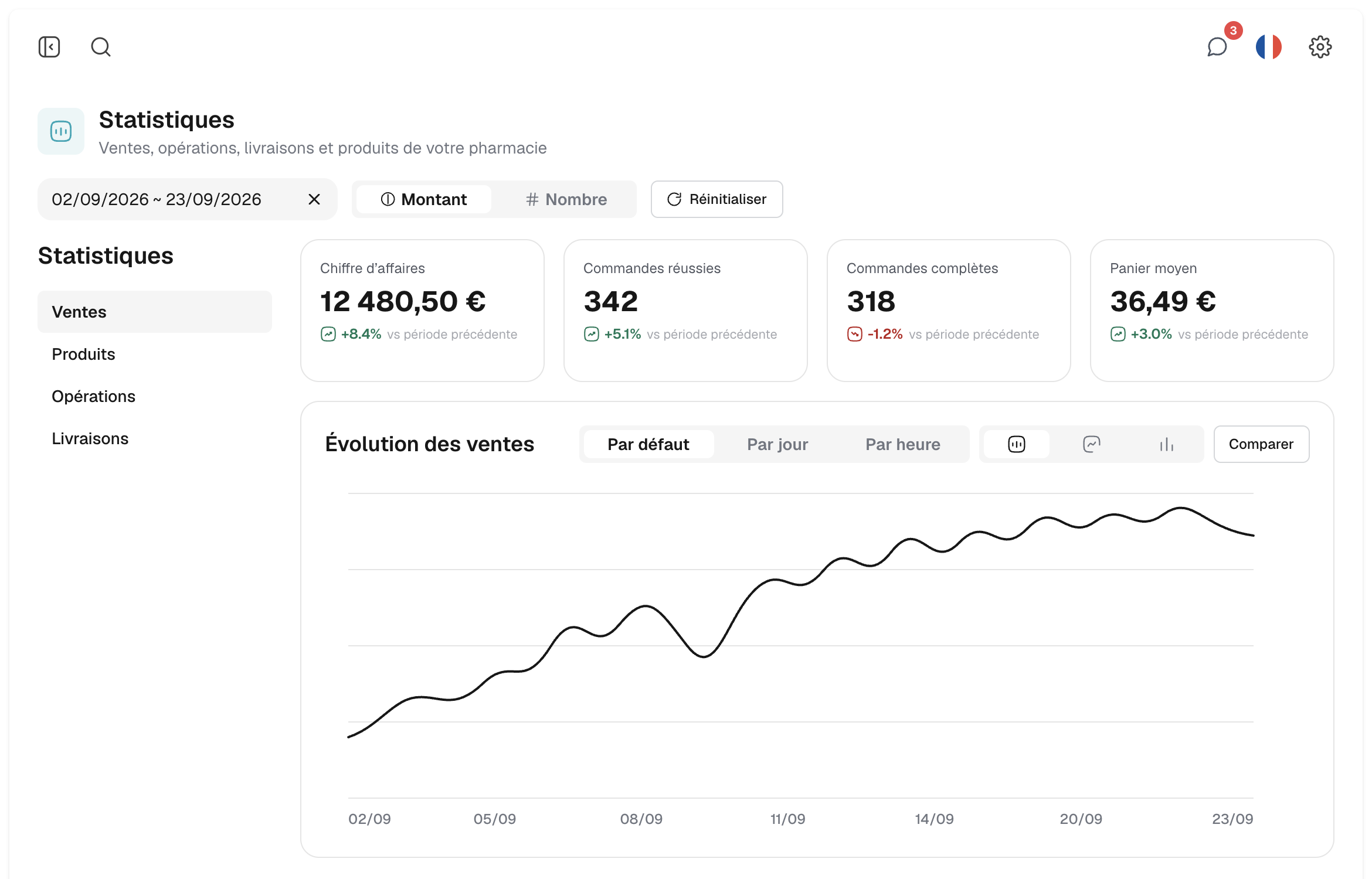
Nexum Pro screen · web
Sales statistics
Revenue, completed and full orders, average basket, compared with the previous period.
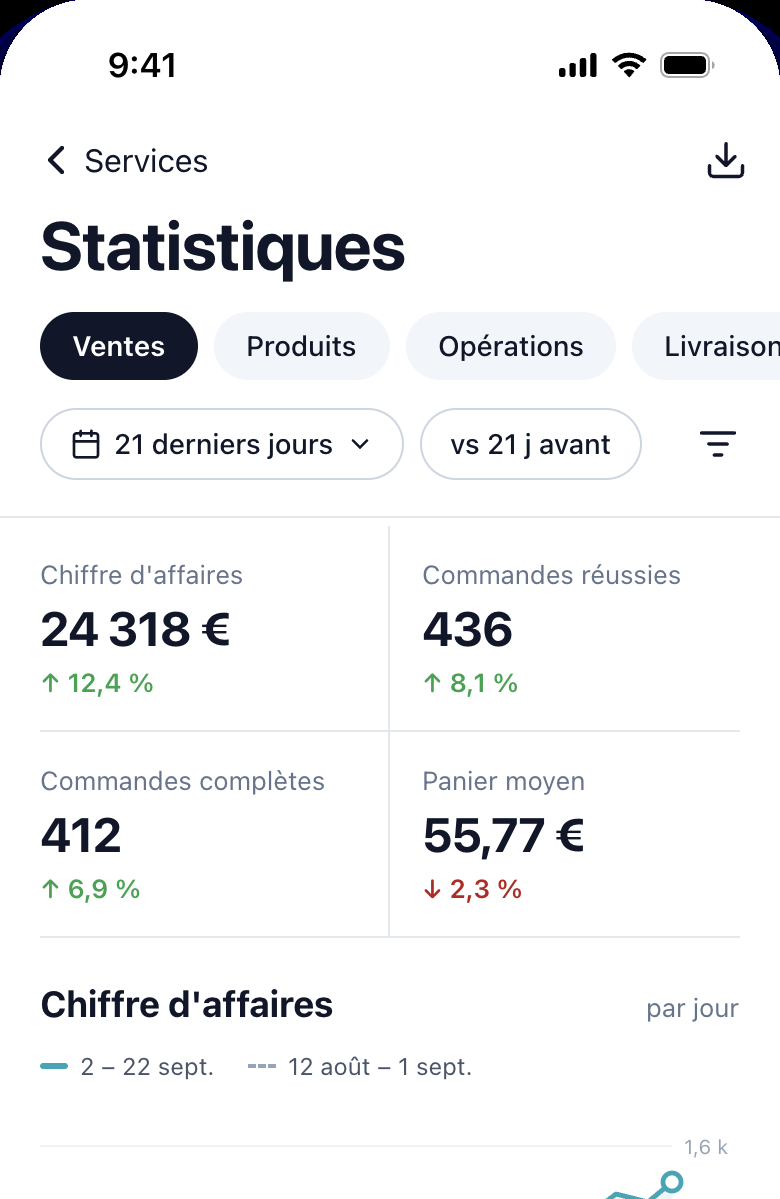
Nexum Pro screen · mobile
Statistics in your pocket
The same sections as on the web, with the period and the comparison, on mobile.
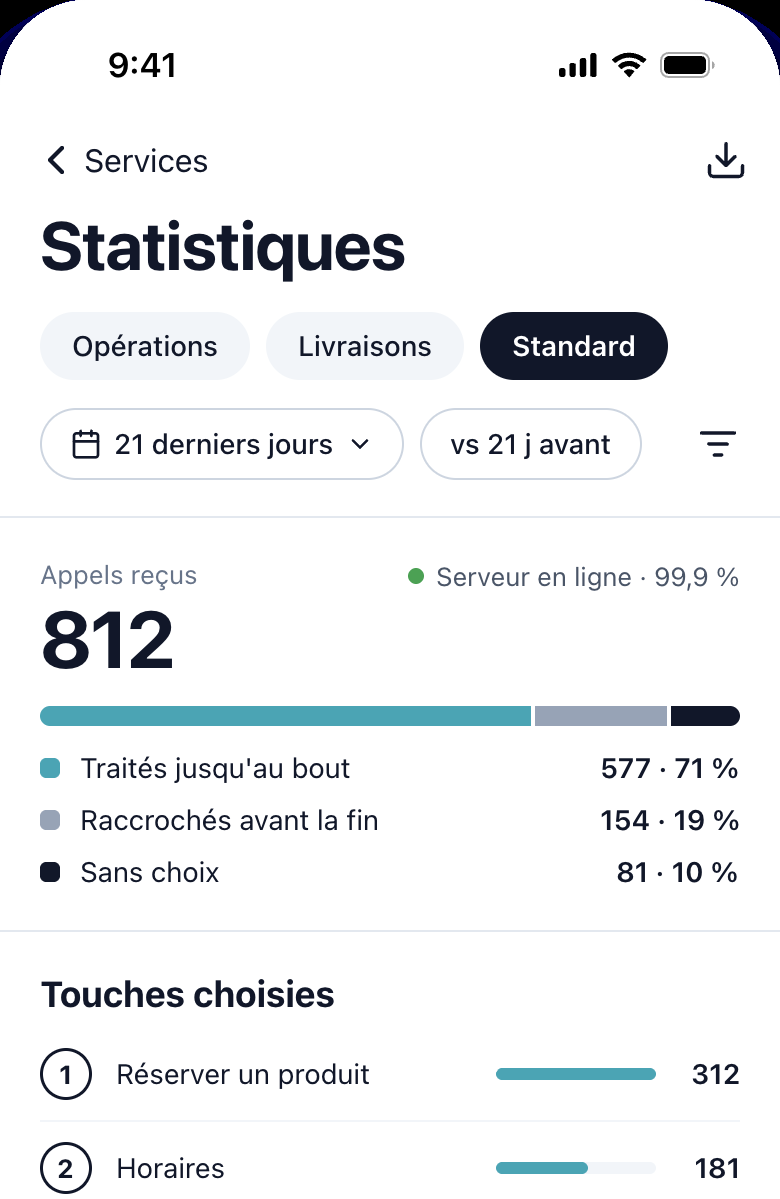
Nexum Pro screen · mobile
Standard vocal IA
Calls received, calls handled to the end and the keys patients choose most.
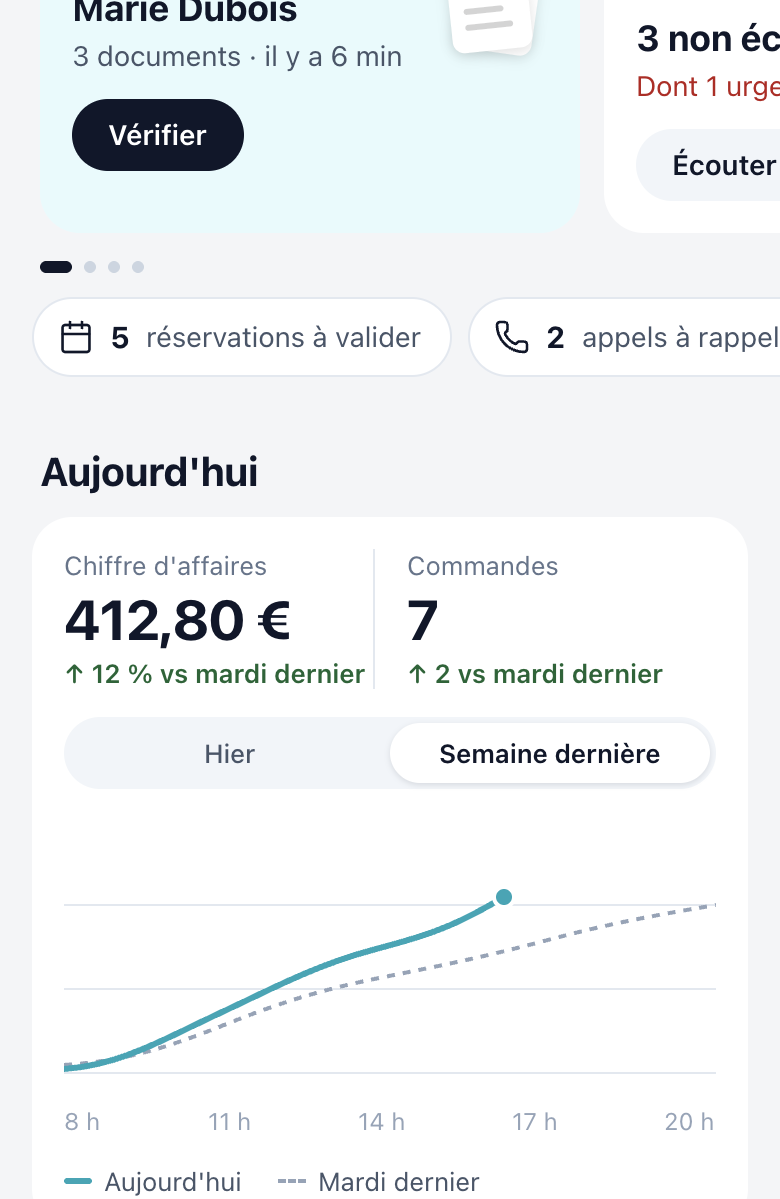
Nexum Pro screen · mobile
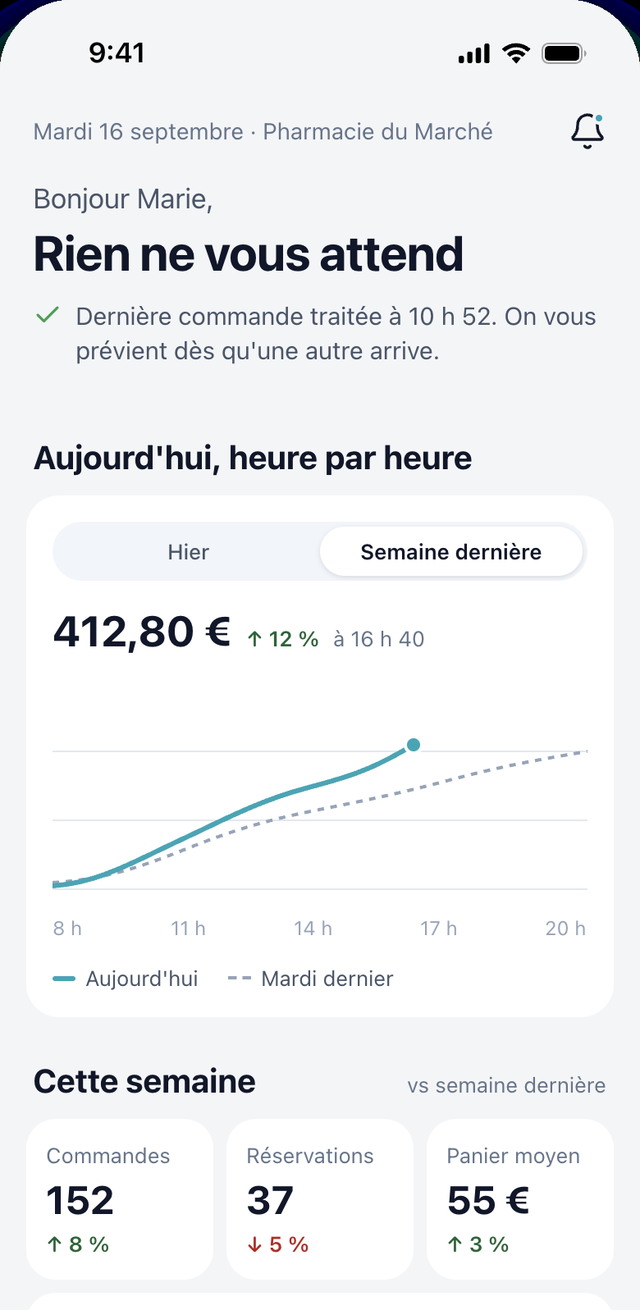
Pharmacy home
Revenue and orders for the day, hour by hour, compared with the same day last week.
Nexum Pro screen · mobile
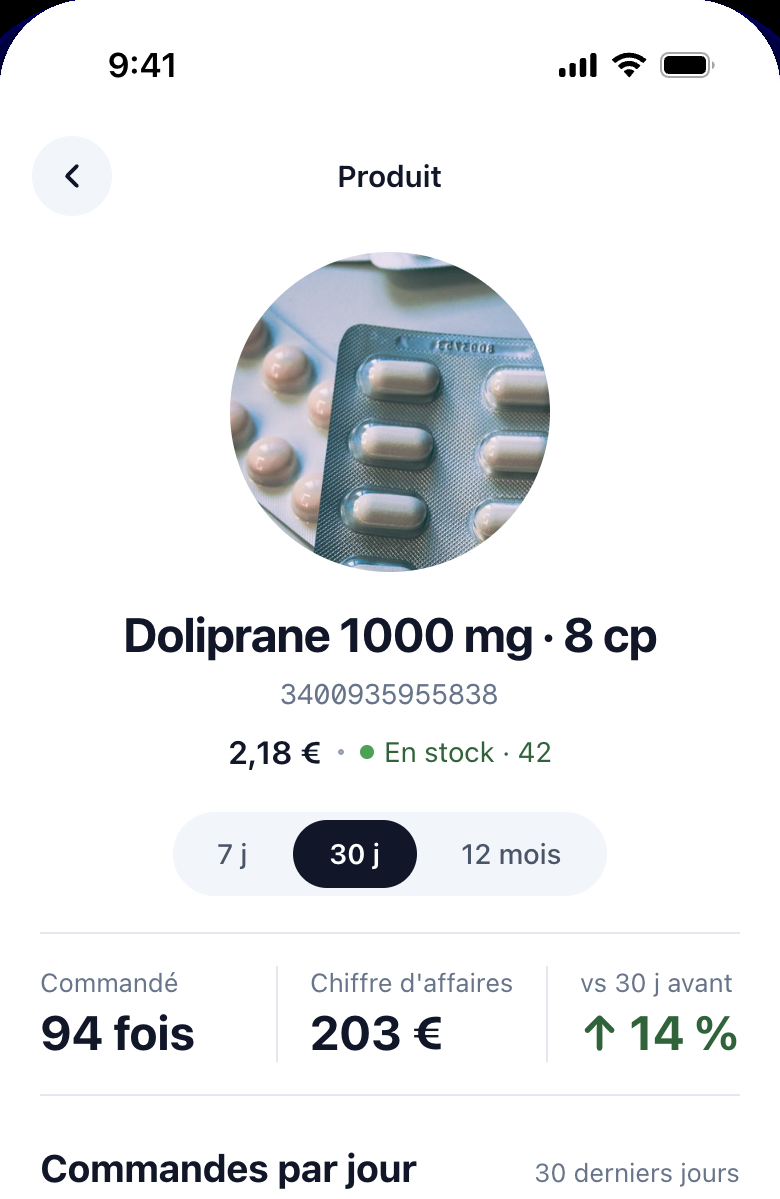
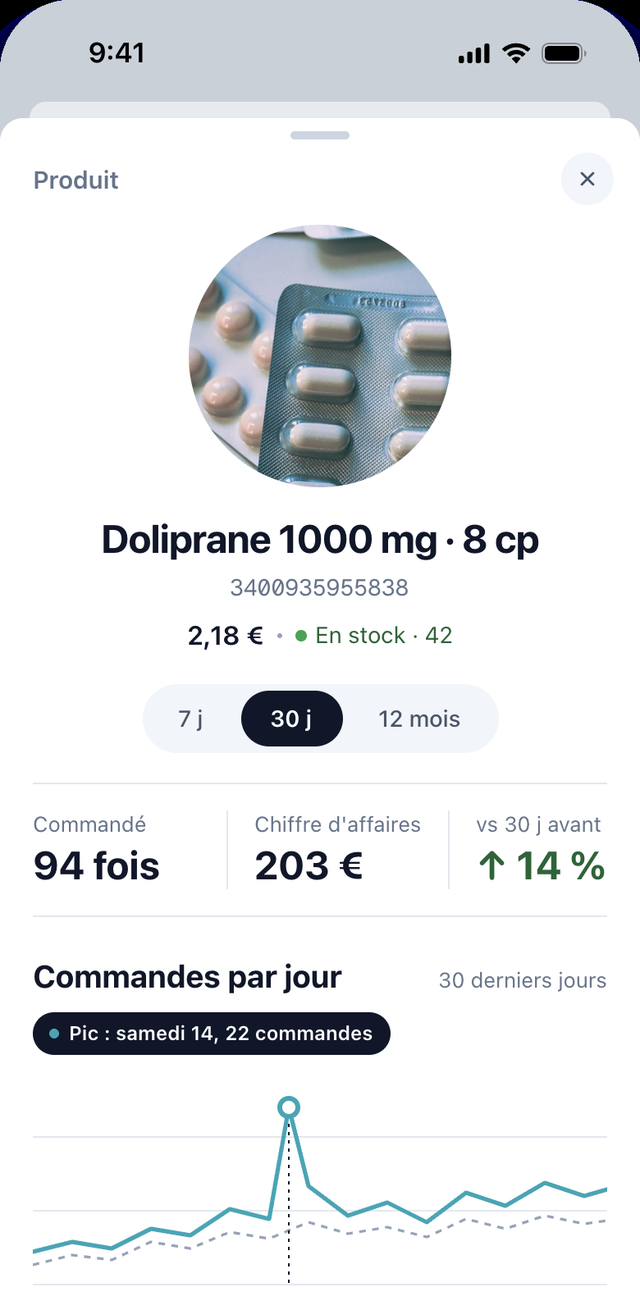
A product page
Price, stock, number of orders and revenue for the product over the chosen period.
The Nexum Pro modules
● Home
● Orders
● Reservations
● Deliveries
● Standard vocal
● Voice assistant messages
● Statistics
● Invoices
● Payment account
● Pharmacy settings
● Opening hours and exceptional days
● Integrations
● My account
● Tutorials
● What’s new
◔ Between pharmacies
◔ Internal assistant
◐ Pharmacy website
Modules recorded in Nexum Pro on 17 September 2026. ● available in the app · ◔ rolling out · ◐ coming. Screens from the redesign currently rolling out; the figures shown are from a sample period, never a performance.
Orders and reservations,whatever the channel.
Nexum Pharma, Uber Eats and Uber, the voice assistant, WhatsApp: everything lands in the same queue, and the team handles it at the counter.
Transcribed voice messagesFlagged urgent when they are, listened to or not, with the callback to make.
WhatsApp and customer chat, one inboxThe assistant answers first; the team takes over when needed.
Dictated or suggested reply◔ Rolling outOn the web or on mobile, the team speaks instead of typing: speech is transcribed and formatted, or a suggested reply is sent in one tap for recurring questions.
Email, SMS and WhatsApp campaigns◐ ComingPrescription reminder, product back in stock, pharmacy news: sent from here, to customers who opted in.
Dictated or suggested reply: rolling out (`WaInbox`, composer and suggestions). Campaigns: WhatsApp is on the roadmap; email and SMS.
Requests already qualifiedA call, a WhatsApp message or an order lands in Nexum Pro with the product identified, the request classified and the urgency flagged, before the team even opens it.
The internal assistant◔ Rolling out“How many orders are waiting for acceptance?”, “Prepare Mrs M.’s reminder”: Nexum Pro answers in conversation and acts, by keyboard or by voice, without changing screen.
The analysis agent◐ ComingStock, sales, discrepancies between the shelf and the management software: the agent spots anomalies and suggests improvements the owner validates, never imposed decisions.
Automated tasks for the team◐ ComingFollow-ups, preparations, ready-order reminders: tasks decided by the owner, carried out by the agents in the cockpit, with a trace of every action.
Automated tasks: client request of 17/09, scope. No medical advice.
What pharmacy owners ask before opening Nexum Pro for the first time.
What is managed from Nexum Pro?
All of Nexum. Orders from every channel, reservations, deliveries, the voice assistant and its messages, statistics and invoices, the team, opening hours, integrations and hardware; soon the pharmacy’s website. One login, on the web and on mobile, for one or several pharmacies.
Does Nexum Pro replace the pharmacy management software?
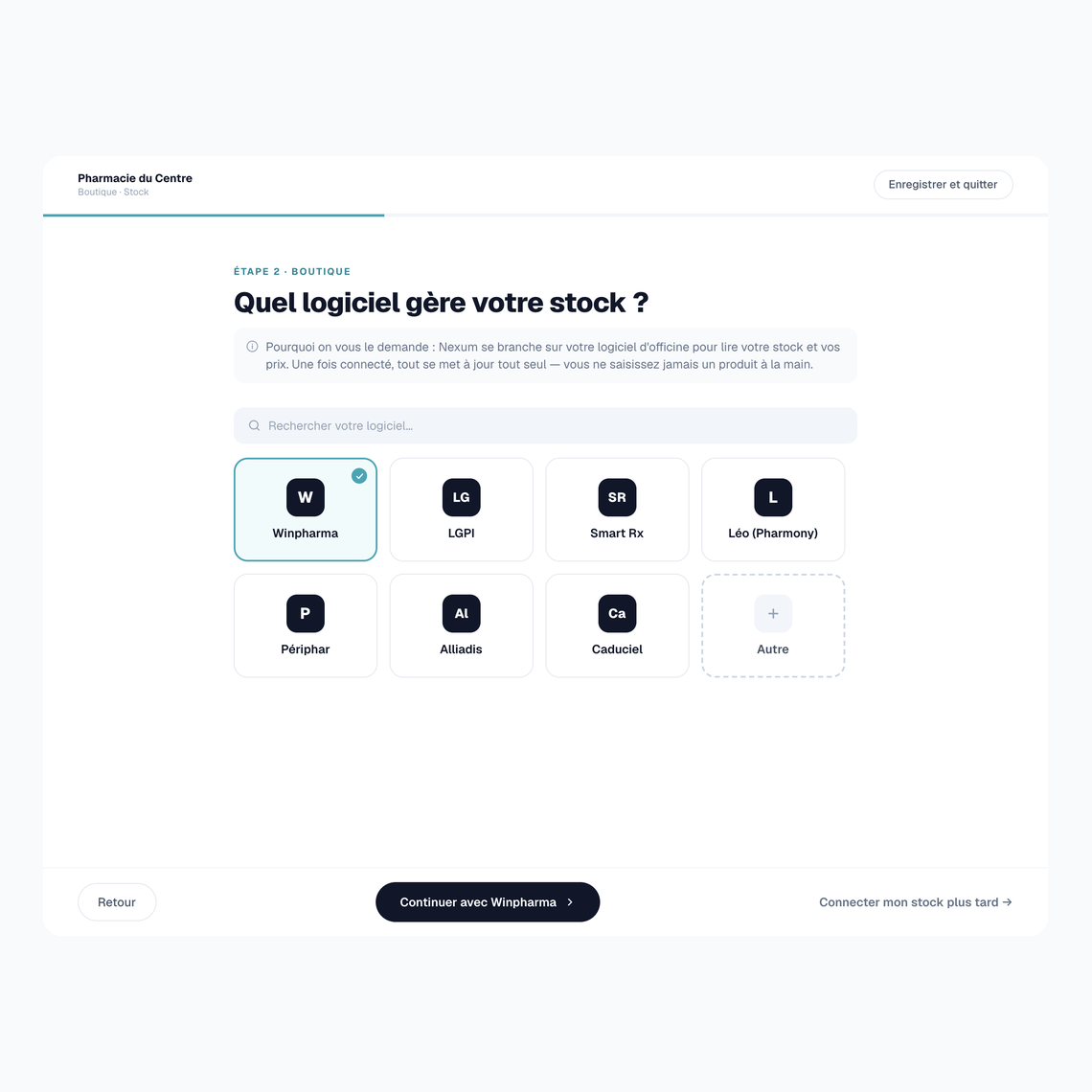
No. The pharmacy management software remains the pharmacy’s own: Nexum Pro links to it through a stock connector, installed once on the counter workstation, which synchronises the stock in the background. Nexum Pro handles what arrives away from the counter: orders, reservations, deliveries, messages, settings.
Can the whole team use it, with different rights?
Yes. The pharmacy owner adds each member by e-mail; they receive an activation code. Two roles exist: user, for counter work, and administrator, who manages users and has access to all settings. Voice assistant messages are assigned to a member, and the audit log keeps track of changes.
Which ticket printer is supported?
The Epson TM-J7200 and TM-J7700 thermal printers. The Nexum desktop app, on the counter's Windows workstation, detects them on its own on the pharmacy's network, then prints the order tickets: a browser alone cannot drive a printer. Printing is tested from the app before going live.
Where are the prescriptions that customers upload hosted?
In France, on HDS servers. An order with a prescription is flagged in the queue and waits for the pharmacist's approval before any preparation; the document can be viewed from the order.
How long does it take to get Nexum Pro up and running?
Two to three days as a rule. The account is opened by Nexum; the pharmacy owner completes the onboarding from the Nexum Pro home (pharmacy details, team, opening hours, payment account) and installs the desktop app on the counter workstation. A pharmacy that has its information to hand can be up and running in two days; allow longer if the group requires a specific integration or billing arrangement.
Is Nexum Pro included in the Nexum offers?
Yes, at no extra cost. Nexum Pro is the control centre shared by every Nexum solution: Nexum Pharma, the voice switchboard, delivery, WhatsApp. As soon as a pharmacy uses one of them, it receives everything in the same place — that is the whole point: one queue, one team, one invoice.
Get started
Nexum Pro, seen in action.
The demonstration is done on the pharmacy’s own cases: its channels, its pharmacy management software, its counter. A member of the Nexum team shows the platform, on the web and on mobile.